A camera can capture thousands of product images in a shift, but those images become useful only when a business can interpret them. Computer vision can help turn that visual data into information people can act on. Many businesses already collect images and video, yet still need a clear way to use them. Artificial intelligence can help connect what a camera sees with decisions that support business growth.
We will look at practical ways to use visual analysis, the choices involved in putting it to work, and the trade-offs businesses should weigh. The aim is a clear starting point, not a promise that every camera or model will solve a business problem. The practical goal is not to collect more images, but to make a sound decision from the ones we already have.
Key Takeaways
- Visual data becomes useful when a system can interpret it.
- The task should match the business decision we need to make.
- Good results depend on useful data and careful testing.
- A pilot can show whether a system helps an existing workflow.
- People remain responsible for important decisions and review.
What Does Computer Vision Do With Images?
A photo becomes useful to a business when a system can identify what matters in it, rather than simply adjust its brightness or contrast. Computer vision is a field of artificial intelligence that interprets images and video. Raw pixels become labels, object locations, or information that can support an action.
Image processing changes or improves image data without necessarily interpreting its content. A tool might sharpen an image or adjust its colors, but that alone does not tell us what the picture shows. Computer vision turns visual content into an interpretation a workflow can use.
Image processing can prepare a picture, while computer vision makes an interpretation that a workflow can use.
Three ideas help explain how a vision system interprets a scene. Recognition identifies visual content, such as a person, product, or defect. It can label a whole image or find specific objects within it.
Reconstruction estimates three-dimensional characteristics from visual information. For example, a system can infer an object’s shape or depth from images. Reorganization infers relationships, such as which object sits on a shelf or which parts belong together.
These ideas can work together. A system may recognize a box, estimate its shape, and infer whether it blocks another item. That interpretation can help a person decide what to check or move.
A vision system does not understand a picture as a person does. It finds patterns in visual data and uses them to produce an output. The output is only useful when it fits a real decision.
How Does a Vision System Learn From Images?
A model trained to flag pneumonia starts with chest X-rays labeled as normal or showing pneumonia, not with an unexplained pile of scans. Labeled examples teach a vision system what patterns may matter. Inference means applying a trained model to new images or video to produce a prediction.
Image quality, variety, and accurate labels affect how well a model works beyond its training examples. A common workflow has five steps:
- Collect images or video that represent the task.
- Label the examples with the correct classes or outcomes.
- Preprocess and augment the data.
- Select a model that fits the task and data.
- Train the model and evaluate it against labeled examples.
Preprocessing can include cleaning files, resizing images, and normalization, which puts pixel values on a consistent scale. Data augmentation creates altered training examples, such as rotated or flipped images. These changes can help a model handle some visual variation.
COCO, ImageNet, and Open Images are examples of annotated image datasets. Each dataset includes images with labels or other visual information. A business may use a public dataset, its own examples, or a mix, depending on the task.
Convolutional neural networks and vision transformers learn patterns in images. Recurrent neural networks can handle sequences, including video frames shown in order. These approaches help models learn visual features, but they still need relevant examples.
Training examples should cover the range of conditions the system will face. A model built on bright, clear images may struggle with dim or blurred inputs. Test the model on representative images it did not train on before trusting its predictions in a live workflow.
Which Computer Vision Tasks Turn Pixels Into Useful Outputs?
A shelf image that needs a simple product label calls for a different task from one that needs every item located. The needed output determines which computer vision task fits. Choose a task by the detail the business needs from the image.
Image Classification and Object Detection
Image classification assigns a label to an image or object. A product photo might receive the label “acceptable.” This is useful when one result describes the whole image or item.
Object detection identifies objects and locates them with bounding boxes. Those boxes mark each object’s position, but they do not trace its exact outline. A shelf image can return labels and locations for several products.
| Task | What it returns | Example input | Example output |
|---|---|---|---|
| Image classification | One class label | Product photo | “acceptable” |
| Object detection | Object labels and bounding boxes | Shelf image | Product locations |
| Image segmentation | A pixel-level map | Electronic component image | Exact component outline |
Image Segmentation for Exact Boundaries
Image segmentation assigns labels to pixels, creating regions called segments. Semantic segmentation labels each pixel by class, such as product or background. It does not separate two objects of the same class.
Instance segmentation separates individual objects, even when they share a class. Panoptic segmentation combines class labels with individual object outlines. These methods can give a vision system more detail than a bounding box.
OCR, Pose Estimation and Tracking
Optical character recognition, or OCR, extracts text from an image. It can read words from a scanned form or a label. Pose estimation identifies body-part positions or the position of parts on an object.
Object tracking follows objects across video frames. It can show where an item moves over time, rather than reporting its location in one frame. The task should match the question: identify, locate, outline, read, pose, or follow.
Each task produces a different kind of output, so the same camera image can support different workflows. Choose the task by the output the business needs, not by the most technical-sounding name.
Where Can Businesses Apply Computer Vision Today?
On a production line, a camera can check each product’s dimensions and color while flagging a missing component. Fast visual checks can help teams spot issues while products move through a process. Manufacturing accounted for 28.49% of the global computer vision market in 2025.
A vision system can flag concerns, but people still need to review results that affect safety or care. Computer vision applications can support inspection, security, and monitoring in many settings. The best use starts with a clear task and a response people can take.
Inspection and Safety in Physical Operations
Manufacturers can inspect dimensions, colors, defects, and missing parts. X-ray checks can help find missing screws inside electronic devices or identify counterfeit batteries. These checks may spot faults that a surface camera cannot see.
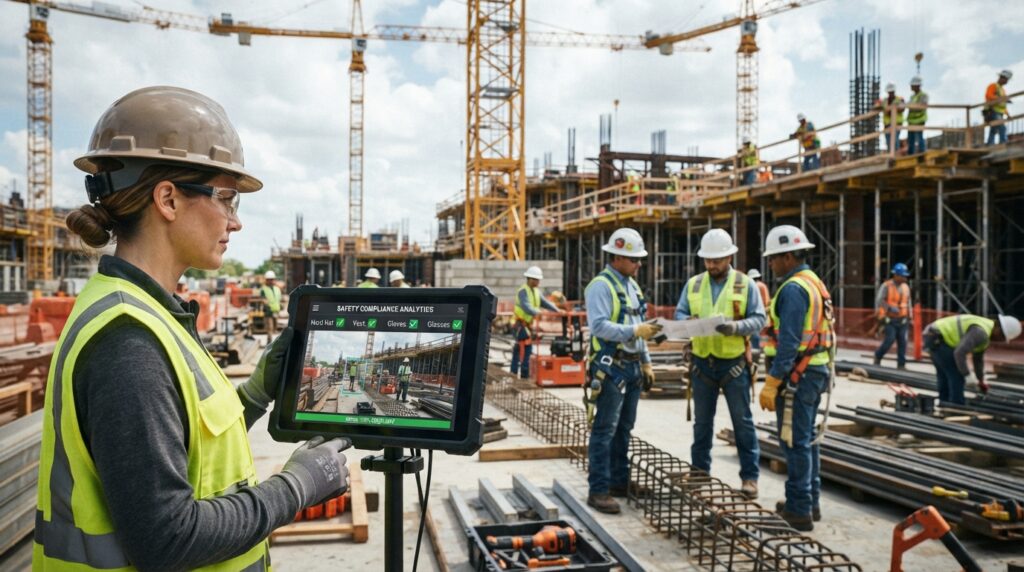
Construction-site monitoring can flag missing personal protective equipment, unsafe scaffolding, equipment malfunctions, or collision risks. Cameras can help alert a team, but a person still needs to assess the scene and take action.
- Product defect inspection on a production line.
- Missing-screw detection inside electronic devices.
- PPE and scaffold monitoring at a construction site.
- Parking-space occupancy detection for drivers.
Medical, Mobility and Retail Use Cases
Medical imaging systems can analyze scans for tumors or other anomalies. Pose estimation can also help monitor patient movement and possible falls. Medical tools support clinical decisions; they do not replace qualified care.
The FDA had cleared approximately 873 AI/ML-enabled medical devices by mid-2025, with radiology accounting for the largest share. Published evaluations of automated diabetic-retinopathy screening report around 87% sensitivity in controlled settings. That sensitivity is not a guarantee for every patient or setting.
Waymo operated fully driverless commercial robotaxi service in ten U.S. cities as of early 2026. Across nearly 100 million driverless miles, the company reported 90% fewer serious-injury crashes than human drivers. Baidu’s Apollo Go had delivered over 14 million rides across 16 cities by mid-2025.
Retail uses include cashierless checkout and camera-based monitoring of occupied parking spaces. A camera can help track which spaces are open, giving drivers current information. These systems still need to work well in the store or lot where people use them.
Treat medical image analysis as decision support, with qualified clinicians responsible for diagnosis and care.
How Can We Measure Business Value and Payback?
A project’s business case starts with a measurable change, such as fewer defects escaping inspection. Return on investment (ROI) compares annual benefits minus annual costs with the total investment, then multiplies by 100%.
ROI = (annual benefits – annual costs) / total investment × 100%. The payback period estimates how long annual net benefits take to cover the investment: total investment divided by annual net benefits.
Potential benefits include fewer defect escapes, better labor efficiency, less scrap and rework, fewer false rejects, higher throughput, and useful quality data. A project may improve several measures, but teams should count only benefits they can track.
| Scenario | Before-and-after measure | Estimated annual savings | Key assumptions |
|---|---|---|---|
| Defect escapes | 0.5% to 0.05% | $90,000 | 100,000 units; $200 per escaped defect |
| Inspection staffing | Two inspectors to 0.5 operators per shift | $225,000 | Three shifts; 250 days; $25 per hour |
| False rejects | 2% to 0.2% | $27,000 | 100,000 products; $15 per false reject |
The examples show how small changes can add up when volume is high. At 100,000 units, reducing defect escapes from 0.5% to 0.05% is estimated to save $90,000 each year, assuming $200 per escaped defect.
Reducing inspection staffing from two inspectors to 0.5 operators per shift is estimated to save $225,000 each year. That estimate assumes three shifts, 250 workdays, and $25 per hour. Cutting false rejects from 2% to 0.2% is estimated to save $27,000 under the table’s assumptions.
These calculations are examples, not promises of results. A pilot can reveal whether the system changes actual costs, throughput, or quality. Use a pilot’s measured annual net benefits, not a projected gross saving, to estimate payback.
Which Computer Vision Software Fits the Job?
A team that needs to read handwriting has a different software requirement from a factory checking parts on a line. Start with the task, then match the tools to the team’s skills and data. A computer vision app can use an open-source library or a managed platform.
Teams that want control over code may choose a library. Teams that want a guided workflow may prefer a platform. Software choices can shape how people label images, train models, and put results to work.
Open Tools and Model-Building Workflows
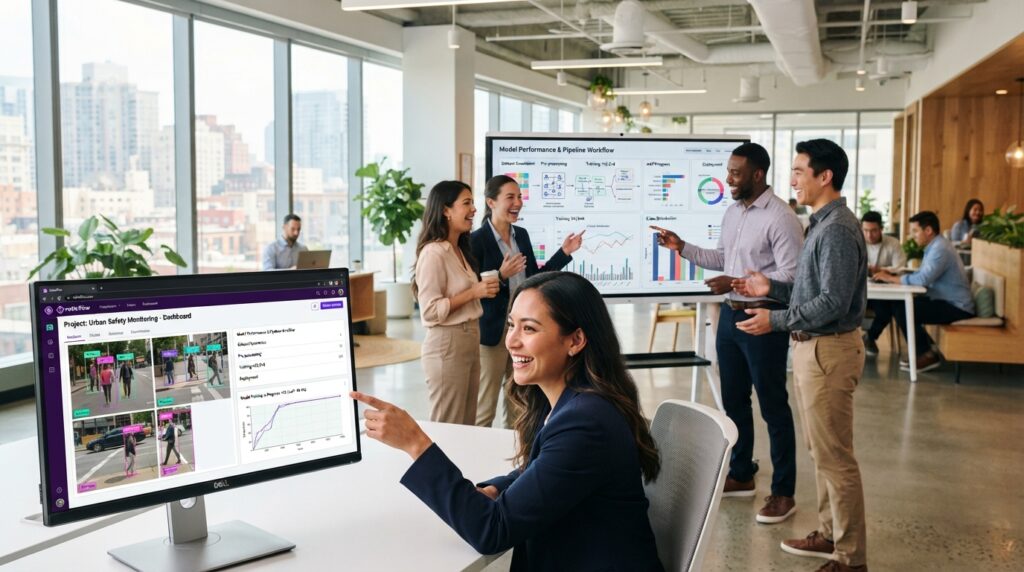
OpenCV is a free, open-source computer vision platform. Developers can use its algorithms for image processing and other vision tasks. Roboflow supports annotation, data augmentation, deployment workflows, and public datasets in Roboflow Universe.
A computer vision book should cover image processing, model training, and hands-on examples. Check that its edition matches your goals, such as learning basic techniques or building neural networks. A book can explain ideas, but practice with real images builds skill.
Platforms for Inspection and Document Tasks
LandingLens offers no-code custom model training for visual inspection and defect detection. Encord annotation supports video projects and medical DICOM files. These tools suit teams that need specific image workflows without building every feature themselves.
Microsoft Azure Computer Vision Read is designed for OCR, including low-quality images and handwriting. Cognex systems support production-line inspection, defect detection, barcode reading, and part identification. IBM Maximo Visual Inspection supports edge and server deployment and integrates with Maximo asset-management tools.
Choosing software for a business workflow also means checking team skills, integrations, and data needs. IBM Maximo Visual Inspection subscriptions start at approximately $47,000 per year. That is a listed starting subscription price, not a universal price for computer vision software.
Teams can build a computer vision app with an open-source library or use a managed platform, based on how much code control they want. Before selecting a platform, verify that its image inputs, workflow, and deployment options match the actual task.
Should We Run Vision Workloads in the Cloud or at the Edge?
A camera that must flag a hazard immediately has a stronger case for local inference than a workload that can wait for a network response. Inference location affects response time, connectivity needs, and where images are processed.
Cloud computing can simplify centralized processing, while edge computing can keep inference near the camera. Cloud-only inference suits work that can tolerate latency and depends on network access. Cloud fallback can help when networks are stressed, while edge-only processing suits local operation needs.
Choose an Inference Location
Cloud systems can make it easier to manage processing in one place. They rely on a network connection, which can add delay or interrupt service. Local inference can respond without sending every image to a remote server.
- Cloud-only: send images to the cloud for inference.
- Cloud fallback: use local processing with cloud support when needed.
- Edge-only: process images locally near the camera.
Match Edge Hardware to the Workload
Edge hardware varies in computing power and energy use. Jetson Orin Nano, Orin NX, and AGX Orin offer 20-275 TOPS at 7-60 watts. TOPS means trillions of operations per second, a measure of computing capacity.
| Hardware option | Performance | Power |
|---|---|---|
| Jetson Orin Nano, Orin NX, and AGX Orin | 20-275 TOPS | 7-60 watts |
| Coral USB Accelerator and Coral Dev Board | 4 TOPS | 2 watts |
| Hailo-8 and successor edge processors | 26 or more TOPS | 2.5 watts |
Coral devices support INT8-quantized models. INT8 quantization uses lower-precision numbers, which can reduce model size and processing time. It typically halves memory use and latency with a modest accuracy reduction on suitable models.
The change can affect the model’s output, so teams need to test accuracy on their chosen model. Test the model’s accuracy and response time on the target hardware before committing to a deployment design.
What Makes a Vision System Fail After Deployment?
A model that performs well on bright, centered product images may miss defects when the production line changes its lighting or camera angle. Real-world variation can make visual inputs harder to interpret. Computer vision accuracy can fall when a camera, product, or environment changes.
Teams need to test models under the conditions they will face after launch. Lighting, camera angle, resolution, and image noise can all change what a vision system sees. Poor image quality can hide important features or create false signals.
Data can also be too limited or unbalanced. A model may learn from examples that do not represent the range of products or conditions in use. Augmentation can add variation, but it cannot replace representative real-world images.
Preprocessing may adjust brightness or contrast, resize images, or smooth noise. Those steps can help prepare visual inputs, but they cannot fix every camera or data problem. Teams should check results on new examples as conditions change.
A model can also fail when its output does not fit the existing workflow. For example, an alert that reaches no one who can act on it will not improve operations. People need clear roles for handling predictions and exceptions.
Monitor performance after launch, including missed detections and false alarms. Keep a process for reviewing both, then use verified examples to decide whether retraining is needed.
How Do We Manage Privacy, Safety, and Fairness?
A vision system can make a confident prediction and still be unfair if its training images do not represent the people or conditions it encounters. Representation matters because missing examples can affect a model’s outcomes. Training data can contain geographic, gender-related, or object-representation gaps.
Test outcomes across relevant groups before using a system for consequential decisions. Uneven results and false patterns in training data can contribute to unfair decisions. Facial recognition and monitoring in workplaces or public spaces need particular scrutiny.
Organizations can reduce risk by limiting what cameras collect and restricting who can access images. They can also set human review for decisions that could affect a person’s safety, work, or access to services. A person should have a way to challenge an important result.
Several U.S. state-law changes took effect January 1, 2026. Comprehensive consumer privacy laws in Indiana, Kentucky, and Rhode Island took effect that day. Oregon’s Consumer Privacy Act amendments also took effect January 1, 2026.
California’s Transparency in Frontier Artificial Intelligence Act took effect January 1, 2026. These laws do not create one rule for every camera or business. Organizations should ask counsel or the applicable authority about their obligations.
Privacy and safety plans should name who owns each task. Teams can set rules for image retention, access, and review before a system begins collecting data. Those rules should fit the setting and the people affected.
Before deployment, document what the camera captures, who can access the data, and how a person can challenge a consequential decision.
What Does Computer Vision Market Growth Mean for Businesses?
A growing market can signal expanding adoption, but it cannot tell us whether a specific deployment will pay off. Market forecasts are context, not a business case. The global computer vision market is projected at $32.88 billion in 2026, with a forecast CAGR of 15.77% from 2026 through 2031.
North America accounted for 49.01% of global computer vision market revenue in 2025. Hardware accounted for 65.21% of the market that year, while software is projected to grow at a 15.87% CAGR through 2031.
Market growth does not replace a clear operational need or measured results. Manufacturing accounted for 28.49% of the market in 2025, while automotive is projected to grow at an 18.23% CAGR from 2026 through 2031. Inspection and quality assurance accounted for 41.08% of market revenue in 2025.
Edge computer vision deployments accounted for 47.33% of the global market in 2025. They are projected to grow at a 17.29% CAGR through 2031. That forecast suggests continued interest in local processing, but does not show whether a specific site needs it.
Treat market forecasts as context for planning, then base investment on a clearly defined business problem.
Conclusion
A useful first project is a focused workflow where a visual decision is frequent, measurable, and costly to get wrong. A bounded pilot can show whether the system helps people make that decision. It also gives the team a chance to test the model with actual operating conditions.
Start with a specific task, representative data, and an outcome the team can measure. Decide in advance what result would justify expanding the pilot. The people who run the workflow can help choose a useful measure.
Choose one such workflow, agree on a success measure with the people who run it, and test the system against real operating conditions.